
Thanks Fatima — your order is confirmed. We will deliver to Marina Tower 3, Apt 1204 by 21:15.
Restaurant POS system with direct online ordering & WhatsApp dispatch
The counter, the online orders and the WhatsApp messages in one system. A POS on an iPad or Android tablet with a cash drawer and printers, your menu on your own address, and every order sent to the kitchen and the rider the moment it is placed. One flat monthly price.
- Cash or card machine on delivery
- 0% commission, always
- Cancel any time
NEW ORDER #1042
2 × Mixed Grill · 1 × Fresh Juice
Ready for pickup. Marina Tower 3, Apt 1204 — GPS pin attached. Collect USD 25.00.
Ask Fatima for a Google review, and add her sixth loyalty stamp.
3 messages sent automatically
Eight common restaurant problems, and how GetMenu fixes each one
Restaurant owners tell us about these again and again. Under each one is how GetMenu fixes it.
Customers order dishes that have run out
When that happens, someone has to call the customer and cancel the order. GetMenu counts down the portions you have with every sale, at the counter and online. When a dish runs out, it shows as sold out and nobody can order it.
Restaurant inventory systemOnly one person answers WhatsApp, so replies are slow
Customers wait for a reply, and some order from another restaurant instead. With GetMenu's WhatsApp ordering system, they order from your menu page without waiting. Within seconds, the customer, your managers' group and your riders' group each get a WhatsApp message, and nobody types the order.
WhatsApp ordering systemNobody suggests extras, so orders stay small
Staff are too busy to offer a drink or a side dish. GetMenu's online menu offers them for you at the right moment, for example fries with a burger, or a combo deal. You choose from ten kinds of suggestion.
Menu upsellingCustomers ask about a dish and get no answer
Is it spicy? Does it have nuts? If nobody replies, many customers do not order at all. With GetMenu's online menu, you can add a photo, a description, the spice level and the allergy information to every dish, so the answer is there before they ask.
Online menu ordering systemSpecial requests like “no onions” get forgotten
A forgotten request means a wrong order. In GetMenu, choices like “no onions” are picked from the menu before the order goes in, at the counter or online. Every choice then prints in bold on the kitchen ticket and shows on the kitchen screen.
Kitchen ordering systemCustomers are never asked for a review
Happy customers rarely leave a review unless someone asks. After each delivered order, GetMenu sends the customer a WhatsApp message with your Google review link. You choose how long after delivery it goes, so nobody on your team has to remember.
Automatic Google review requestsNobody reminds customers to order again
A customer who liked your food can forget about you. GetMenu sends a WhatsApp reminder to order again a set time after each delivery, and messages customers who have stopped ordering. Customers can also keep your loyalty card in Apple Wallet or Google Wallet.
Restaurant marketing softwareRiders cannot find the customer's building
Many buildings have no clear name, so the manager forwards the location and the rider keeps calling the customer to ask the way. At checkout, GetMenu's restaurant delivery software asks for the customer's location pin, their building from your list and their unit number, and sends all three to your riders' WhatsApp group.
Restaurant delivery software
Watch one order go from a WhatsApp hello to the kitchen, the rider and the POS
Press the button on the phone and watch a single order travel from WhatsApp to the kitchen, the rider, the review and back to your counter.
Messages are end-to-end encrypted.
Showing Orders
Ready when you are
Press the green button on the phone to send Fatima's first message.
Read the whole journey as text
Hello
- Meet Fatima. She is hungry, so she messages Noor Cafe on WhatsApp.
- She says hello. An automatic reply sends back the menu link at once.
The menu
- She taps the link. Noor Cafe's own menu opens. No app, no sign-up.
- A karak tea goes into her cart.
- Chicken shawarma. She picks extra spicy, and that choice stays with the order all the way to the kitchen.
- The menu suggests fries to go with it. She adds them in the same tap.
- At checkout she drops her location pin, picks her building from the list and adds her flat number.
- A note for the kitchen: no onions, please. Cash on delivery. Then one tap on Place order.
The restaurant
- The same second, the order lands on Noor Cafe's orders board, note and all. Fatima gets her confirmation.
- At the same moment, the managers' group gets the ticket and the riders' group gets the job with her map pin.
- A manager taps Accept. The ticket shows on the kitchen screen, and Fatima hears the kitchen is on it.
- The cooks tick off each dish, then tap Ready.
On the way
- Ahmed takes the order out. Fatima's message tells her who is bringing it.
- Ahmed hands it over and taps the link in his job message. Fatima is told her order has arrived.
- Every message, and exactly when it went. Nobody at Noor Cafe typed a single one.
After the meal
- Delivery also starts two timers: a review request and a nudge to order again. You choose both delays.
- 30 minutes after delivery, Fatima is asked for a Google review.
- 20 hours after delivery, close to her next meal, she is invited to order again.
Loyalty
- She orders again. The moment it is marked delivered, a stamp is added, and the loyalty card in her phone's wallet updates itself: 4 of 5.
- Saturday, she walks near Noor Cafe. On iPhone the card can appear on the lock screen when the customer is near a place you choose.
The POS
- She walks in. At the counter, staff tap two items on the POS.
- She pays cash. The POS shows the change to give back.
- Paid. The receipt prints, and it can go to her WhatsApp too.
- The counter sale joins the same orders board and kitchen screen as every web order.
One restaurant POS with online ordering, not two screens
A counter sale, a web order and a WhatsApp order are the same thing to the kitchen: one ticket, one stock list, one report. Nothing is typed twice.
At the counter
The POS on an iPad or Android tablet. The cash drawer opens through the receipt printer, the receipt prints, and the sale lands on the same orders board.
- Cash and card sales kept apart
- Tables, tabs and split bills
- Shifts with a drawer count
Online and at the table
Your menu on your own address, and a QR code on every table. Options, add-ons and live stock, the same for every channel.
- Required choices the kitchen can trust
- Sold out everywhere at once
- Group orders on one bill
On WhatsApp
Three messages the moment the order is placed: the customer, the managers' group and the riders' group with the map pin. Then the review request and the reminder, on their own timers.
- From your own number
- A text when WhatsApp cannot deliver
- Every message logged
iPad and Android POS with cash drawer and receipt printers
Run the counter on a tablet you already own. The drawer opens through the printer, the receipt prints, and the kitchen gets its ticket on a screen or a printer.
- iPads and Android tablets, or an all-in-one touch terminal
- Cash drawer that opens through the receipt printer
- Printers over USB (on the LAN), network, Bluetooth, or built in
- Tables, tabs, split bills, shifts and a kitchen screen
- Online orders arrive on the same screen as the counter sales
Counter sale · 19:40 · cash
Drawer opened · receipt printed · kitchen ticket sent
A restaurant online ordering system on your own address
Your menu on your own address, built to be used with one thumb while somebody is standing in a lift. Options, photos, live stock and a checkout that takes a map pin.
- 12 layouts and 57 colour themes, so it looks like your restaurant rather than a template
- Options and add-ons with required choices and limits the kitchen can trust
- Stock that counts itself down and flips an item to sold out at zero
- Upload your menu from a spreadsheet instead of typing 140 items
WhatsApp ordering system: three messages the moment the order is placed
No dashboard to watch, no tablet beeping in a corner. Every order arrives in the WhatsApp groups your kitchen and riders already live in.
- Three messages the moment it is placed — the customer, the managers' group and the riders' group
- Order messages never queue behind marketing. They travel in a separate lane that cannot be blocked
- A weekly cap per customer, and overlapping campaigns held for you to approve
- Sending pauses itself if failures climb, before your number gets hurt
- SMS when WhatsApp cannot deliver, so a customer who is not on WhatsApp still gets their confirmation
Restaurant delivery software built for buildings without names
The address is settled at checkout, once, by the customer. The rider gets a pin, not a phone call.
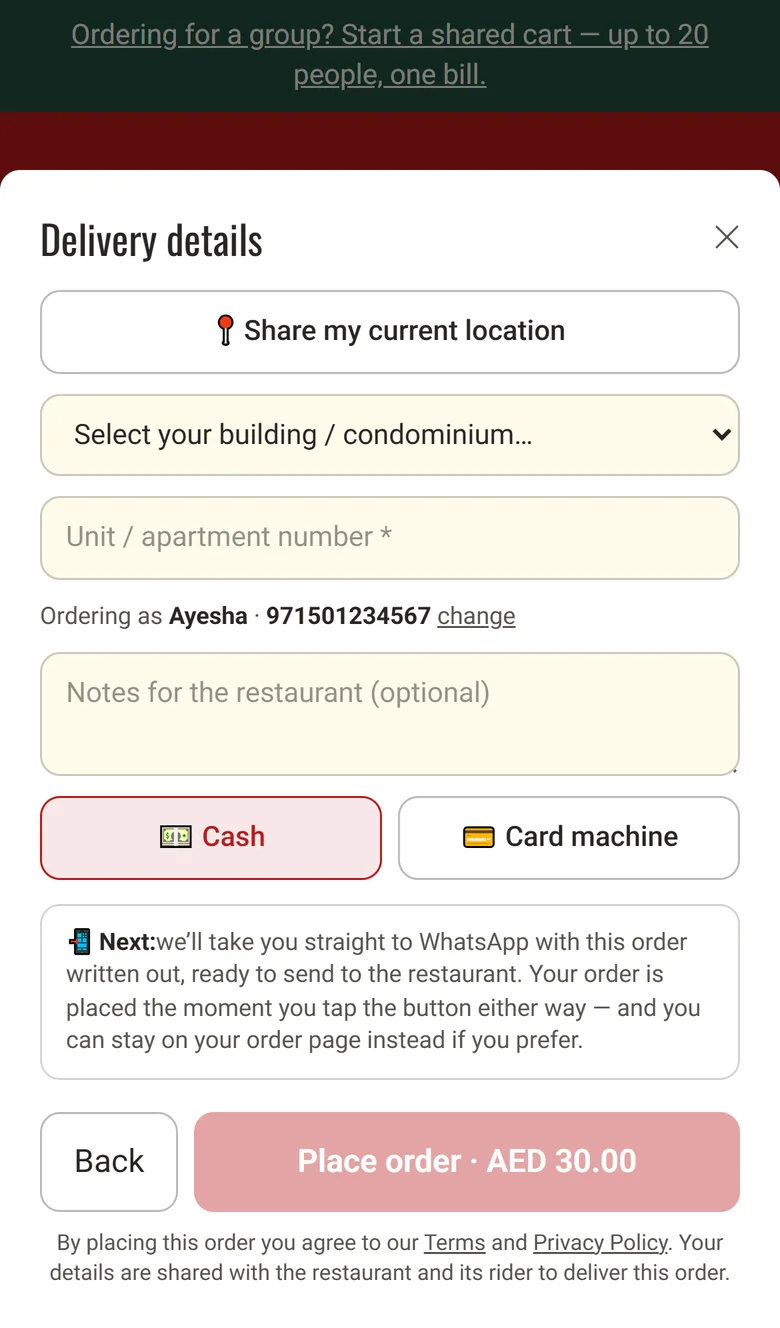
- A map pin dropped at checkout, and the building picked from your list
- The unit number typed by the customer, never relayed by a manager
- The riders' group gets the job with a one-tap map link
- A delivery fee per building, and free delivery over a threshold you set
- Rider links that work without an account: one tap marks it delivered

Loyalty cards in Apple Wallet and Google Wallet
No app to install, no paper card to lose. It sits in Apple Wallet or Google Wallet beside their boarding passes, and updates itself every time they order.
- Stamps three ways — per order, per dollar, or only on the dish you want to sell more of
- Tiers with automatic discounts your regulars grow into, plus streaks and birthday rewards
- The card updates itself — nobody on your team marks anything delivered
- Send messages to customers when they are passing by your restaurant or any chosen location (High in demand right now)
- No app, ever. One tap from their order confirmation and it is in their wallet
🎁 Free dessert waiting · expires in 12 days
Everything in one restaurant management system
Every one of them talks to the others, so a price change, a sold-out dish or a new customer only ever has to be entered once.
- An address on getmenu.ae, included from day one
- 12 page layouts to suit how your menu reads
- 57 colour themes and a font picker
- Photo style toggle — square, tall or none at all
- Built for one thumb, on a phone, in a lift
- Cart takes name and number before checkout
- Secret menu hidden behind an unlock code
- Counts per item that fall as orders come in
- Counts per option too — run out of one sauce, not the dish
- Sold out flips itself at zero, with no one watching
- Low-stock alerts before it becomes a problem
- Cancel an order and the stock comes back
- A movement history showing where every unit went
- Every line re-priced from your menu at checkout
- A double tap cannot order twice
- Opening hours enforced, with scheduled ordering
- Minimum order value before checkout will run
- Auto-confirm timer for when the kitchen is flat out
- A status page per order, no login needed
- Confirmation to the customer the moment they order
- A ticket to the managers' group
- A dispatch to the riders' group, with the pin
- Marketing in its own lane, never delaying an order
- A weekly cap per customer, so nobody is pestered
- Overlapping campaigns held for you to approve
- Sending pauses itself if failures start climbing
- A log of every message and whether it arrived
- SMS from your own SIM when WhatsApp cannot deliver
- A GPS pin dropped at checkout
- Building and unit number picked from a list
- A delivery fee per building, set by you
- Free delivery over a threshold you choose
- Rider links that work without an account
- Totals rounded to 25 fils, so change is simple
- A code for every table, generated for you
- A designer so the code looks like your brand
- A print pack emailed to you, ready for the printer
- The table is the address — nothing else to type
- Group ordering — one bill, everyone's phone
- Rewards for scanning again on the next visit
- Stamps per order, per dollar or per dish
- Tiers your regulars grow into
- Automatic discounts attached to a tier
- Streaks for ordering week after week
- Birthday and anniversary rewards
- Rewards that expire, so they get used
- Nobody has to mark an order delivered for it to count
- Google Wallet — live and updating itself today
- Apple Wallet: Live
- No app to install, ever
- A designer for the card's colours and logo
- The reward shows on the card when one is waiting
- Lock-screen reminders when a regular is nearby
- Broadcasts to everyone holding your card
- Ten kinds of upsell — pairings, ladders, thresholds
- Coupons with caps, exclusions and expiry dates
- Bundles — any three for a fixed price
- Buy one, get one, on the items you pick
- Discounts never stack by accident — best one wins
- Win-backs when a regular has gone quiet
- Abandoned cart nudges and referral programmes
- Ready-made campaigns for Ramadan, Eid and National Day
- VAT invoices carrying your TRN
- A PDF the customer can download without logging in
- Invoice numbers in one unbroken sequence
- A total that is the sum of its lines, always
- A sales dashboard by day, item and channel
- Export to a spreadsheet whenever you want it
- Several branches, each with its own menu and hours
- Owner and manager logins
- An audit log of who changed what, and when
- Export your customer list on any day, including your last
- Erase a customer without losing the books
- Old order details cleared automatically after 120 days
- No card details anywhere — there is nothing to steal
Pick any of them to see what is inside
Built for the way your kitchen actually works
Delivery only
Cloud kitchens and home kitchens working out of a tower or an industrial unit.
- Delivery fees set per building
- Riders dispatched over WhatsApp
- Offers aimed at one tower at a time
- No shopfront needed at all
Dine-in
Restaurants and cafés with tables, where the queue at the POS is the bottleneck.
- A QR code on every table
- Tickets carry the table number
- One bill for a whole table
- Loyalty from the first visit
More than one branch
Two outlets or ten, each with its own menu, hours and delivery area.
- Separate menus and prices per branch
- Its own WhatsApp groups per branch
- Logins that only see their own outlet
- Sales side by side in one view
Plain pricing, in your currency
Three plans, one monthly price each, nothing per order. The prices are on the pricing page, shown in your own currency.
Starter
For a single kitchen taking its first orders online.
- Storefront, menu and themes
- WhatsApp order fan-out
- Stock, riders and delivery areas
See the price in your currency
Start freeGrowth
For a restaurant that wants repeat customers, not just orders.
- Everything in Starter
- Coupons, upsells and messaging
- Dine-in QR, invoicing and wallet cards
See the price in your currency
Start freePro
For kitchens running loyalty and campaigns properly.
- Everything in Growth
- Full loyalty engine and tiers
- All 72+ promotion mechanics
See the price in your currency
Start freeStraight answers
Do customers need an app?
No. Your menu is a normal web page they open from a link or a QR code, so there is nothing to install. The loyalty card goes into the Apple Wallet or Google Wallet already on their phone, and it updates itself after every order without anyone on your team marking anything.
How do customers pay?
Cash or your card machine, at the door or at the counter. There are no online card payments on the ordering page, which also means no card details exist anywhere in the system for anyone to steal. The POS records cash and card sales separately and prints the receipt.
Do the messages come from my own WhatsApp number?
Yes. The confirmation to the customer, the ticket to your managers' group and the job to your riders' group all go out from the WhatsApp number you connect, so customers see a name they know. You connect it once by scanning a code; there is no second phone to carry.
What happens when WhatsApp cannot deliver a message?
If a customer is not on WhatsApp, or a message cannot be delivered, their confirmation goes out as a text instead, from an Android phone with a SIM that you connect. One message, one channel, so nobody thinks they ordered twice. Your telco charges for the texts; the feature costs nothing extra.
Do you take a commission on orders?
No. You pay a flat monthly price for the software and nothing per order, however many orders you take. Every dollar a customer pays goes to your business. The plans are shown in your own currency on the pricing page, and the first 15 days are free with no card needed.
How long does it take to start?
Most restaurants take their first order the same day. Upload the menu from a spreadsheet instead of typing it, connect WhatsApp by scanning a code, and print the QR cards. The POS is switched on when the tablet is ready; the drawer and the printer pair in minutes.
Whose customers are they, and can I export them?
Yours. Names, numbers and order history belong to your restaurant, never to an app. You can export the whole list as a spreadsheet whenever you like, including on the day you decide to leave, and a customer can be erased on request without losing your records.
What happens after the 15 free days?
You pick a plan and carry on, or you do nothing and the account is suspended. We do not ask for card details to begin the trial, so nothing is charged by accident. Your menu and settings are kept for a week after that, so you can still pick a plan.
Take your next order on your own terms
Fifteen days, the whole system, no card details. If it does not suit your kitchen, walk away and nothing has been charged.
